


Several algorithms must make random choices at certain points during their execution. For example, the graph construction algorithms randomly select the location for a department node from a list of equivalent locations, and the layout simulated annealing improvement algorithms pick randomly the next departments that are considered for an exchange. These random choices are made based on the next pseudo-random number. The sequence of these random numbers depends on the starting number of the sequence, which is called the seed. When started from the same state, algorithms will generated the same solution if it has been given the same seed. You can set the random number seed by executing the Seed command from the Edit menu. The Seed dialog will be shown. The Seed dialog is shown in Figure 2.19. Set the seed to 12345. Press Ok to accept the new value.
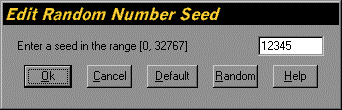
Figure 2.19. Seed Dialog