


You can specify the amount of information shown on the screen and printed to the Output Log file during algorithm execution by setting the Report Level. To set the Report Level execute the Report Level command from the File or Edit menu. The Report Level dialog will be shown. The Report Level dialog is shown in Figure 2.16. There are six possible levels, range from zero for no pauses and no information to the log file, to five for numerous pauses and extensive details to the log file. Select level three for uninterrupted algorithm execution. Press Ok to accept the new level.
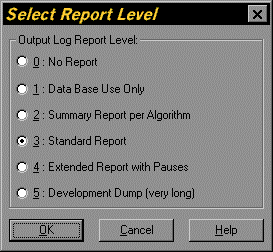
Figure 2.16. Report Level Dialog