


The Select Layout command of the Algorithms menu displays the Select Block Layout Algorithm dialog window, which lets you specify settings for the algorithm that will create a block layout for the current project. These algorithms are called layout algorithms. You must first specify three algorithm settings: building orientation, exchange improvements, and space allocation method. The Select Block Layout Algorithm dialog window is shown Figure 2.21. Select the Up orientation and Steepest Descent with Two Exchanges improvement procedure and select the Layered space allocation method. Because of its extensive computations this command might take a long time to complete. When you press OK the block layout algorithm will be executed with the current settings. If you press Cancel then no algorithm will be executed.
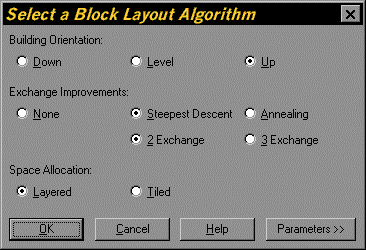
Figure 2.21. Select a Layout Algorithm Dialog