


You manual modify the data with the Department and Relation commands. To evaluate the impact of you changes you use the Evaluate command of the Algorithms menu. The Evaluate command computes the adjacency score of the adjacency graph and the distance score and adjacency score of the block layout if these have been created. It displays the distance score without shape penalty, called the flow distance score, for the block layout in the Delta Objective field. The results are displayed in the Notes and Statistics views. The Evaluate command is most frequently used after you have edited interactively the relationships after you have dragged a department in the adjacency graph to a new location. The Evaluate command does not create a new graph or block layout, but rather computes the cost of the current graph and layout based on the current relationship values. The command also displays in a dialog window the total distance score, the flow distance score, and the total shape penalty for the current layout. It also displays for each department the actual area, shape ratio, and perimeter ratio. The Evaluate dialog window is illustrated in Figure 2.22.
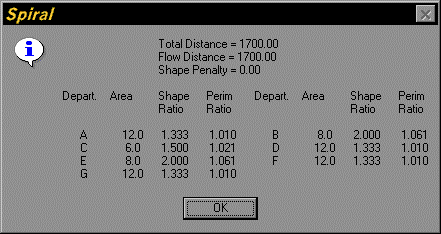
Figure 2.22. Evaluate Dialog Window