


The Display Distances command displays a two dimensional grid with the centroid-to-centroid distances between each pair of departments and between a centroid of a department and the outside. This command does not compute a new layout or new distances, but merely displays the current distances in detail. The Display Distances dialog window is illustrated in Figure 5.43.
If the centroids of two departments are located at coordinates  and
and  then the rectilinear centroid-to-centroid distance is given by:
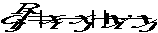 (5.3)
(5.3)
If the origin of a department is denoted by (x, y), its size by (w, l), and the building dimensions by (W, L), then the rectilinear distance between the department and the perimeter is given by
 (5.4)
(5.4)
Further information can be found in the section on Distance Statistics of the Design Algorithms chapter. See also the Display Flow-Distance Costs command to display material handling costs in the current layout and the All Relations command to display the departmental relationships.
For more information see:
Display Distances Dialog Window