


Add one by one the departments to the current project by selecting the Add Department command from the Edit menu. The Add Department dialog box will be displayed.
Since we are defining a new department, only the items on the page with the Input tab are relevant. Enter the label of the department as the single letter A, enter the name of the department as "Receiving", and set the area of the first department to 12. The maximum shape ratio has been set to its default 2.5 value and we will leave it unchanged. Set the layout position to free, and set the area and border color of the department to palette colors green and black, respectively. The Add Department dialog window for the first department is shown in Figure 2.7.
If you press OK in the Add Department dialog box, the department will be added to the project with its current attributes. If you press Cancel the department will not be added to the project.
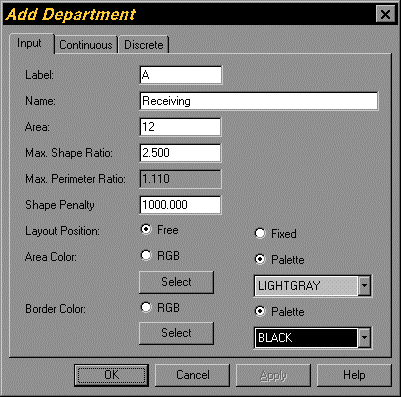
Figure 2.7. Add Department Dialog for the Tutorial Project